Silicon Shecky

Infosec Practitioner

  • About
  • Categories
    • General
    • Computers
    • Software
    • Rants
    • Security
    • Internet/Music
    • Reviews
    • Microsoft
    • Hardware
    • Mobile Computing
  • Links
    • Infosec
      • Burbsec
      • Infosec Exchange Mastodon
      • Hacks4Pancakes Blog
      • Krebs On Security
      • Bleeping Computer
  • Archives

Connect

  • Bluesky
  • LinkedIn
  • Mastodon
  • RSS
  • Twitter

[footer_backtotop]

Copyright © 2025 ·Sixteen Nine Pro Theme · Genesis Framework by StudioPress · WordPress

Device vs. User

September 10, 2021 By Michael Kavka Leave a Comment

Identity is the new perimeter. We keep hearing that, especially from Microsoft. Unfortunately, they have not completely bought into this in their Defender suite of security products.

Microsoft Defender security products are nice. They work decently, Gartner likes them, but there is a problem with them. They focus on the device too much as far as some key features go. I specifically am talking about alerting and web filtering. This is made apparent when designing policies for either. Here is an example, you make a custom detection from a hunting query, and it gets applied to a device group. Alert e-mails get sent out to those e-mail addresses that have been specified for that group. This can and does create a bunch of alerts that go to a helpdesk which has no clue on what to do about them, besides the security people who are the ones who should be looking into them. Groups of IT people start ignoring the alerts from Defender, and now you are almost as insecure as you would be without defender. I say almost because there is protection, and maybe even automatic investigations/remediation, but you do not have eyes on it to check for false positives, nor to check the alert overall and see if it is part of a larger attack. This is one way where Microsoft’s Device Group only thinking fails. Make sure you alert only those that need to be alerted. This cuts down on alert fatigue.

Another way I am seeing it fail is with their web filtering feature. This is becoming more prevalent as Defender for Endpoint is now able to be rolled out to mobile devices besides workstations/laptops. This failure is not just a Microsoft problem, I have seen other well known web filtering fail at the whole user identity protection (I’m looking at you Cisco Umbrella, but that is a not keeping up with technological advance (AD vs. Azure AD vs. Hybrid vs. Both)). Microsoft again wants you to apply per device group in your MDE tenant. So if you have person X who has a Laptop, Phone, Workstation and Tablet all of which are suppose to be covered by the web filter policy, you have to manage all 4 devices in their respective groups. Wait, there is more! You now also have to make multiple device groups for similar devices based on a persons function and what they are allowed. All this extra work instead of being able to say people in AD(or AzureAD) group X get web policy Y. You get identity information into MDE, it should not be so hard for Microsoft to allow this for better control.

All of this starts to fall into the identity space, which is definitely the new perimeter. You bring your identity with you everywhere you go. Identity is the most attacked thing right now because it gives that initial foothold. I am not saying get rid of device group policies, but make sure that identity policies are also available. The real answer is both devices and identities do need to be secured, there is no question. The problem is we are tackling the application of these secure controls and alerts to a device instead of to the identities. If you switch devices your new device has to get put into all the right policies instead of being automatically put into the policies that your identity would already be a part of.

This is a starting point, and one that should be discussed and debated respectfully. Security software and alerting has come so far from where it use to be, but I feel we are seeing some major mistakes with how it is being designed. These flaws, just like any flaw, can and will be exploited. The final question is doe the companies like Microsoft actually want to listen to us or are they going to just shove their flawed way of doing it down our throat?
Filed Under: Microsoft, Security, Software Tagged With: Device Groups, Identity, MDE, Microsoft, Microsoft Defender

The one about banking passwords…

March 5, 2021 By Michael Kavka Leave a Comment

The world of cybersecurity understands the need for secure passwords. While passwords with special characters, numbers and both capital and lower case letters help make them more secure, length is a factor. These reasons, alongside with using unique passwords are why we recommend password managers. It has been a long running feud with sites to get them to allow some of these factors, especially Banking sites. The most common things they have issues with is long passwords and special characters, and some of this stems from legacy systems that might still be in production. Mainframes that do the actual work tend to have less secure requirements (I have seen this in many companies that have mainframe systems for specific things).

There is now another issue into the mix, and that is financial software. I recently was trying out Quicken, which I had used years before, to see if I could recommend it to someone I know after they had asked about it. My prior experiences with it had been positive, and I was glad to see that things looked pretty much the same, but updated and a bit easier to use. That was until I went to enter one financial institutions password to get transactions. Quicken itself has decided that you should use only up to a 12 character password (I use much longer ones), and will not work with longer passwords. Not only do they do this, but the error message puts the blame on the financial institutions, which is an outright lie.

When I talked to support they apologized and said there is nothing that can be done at this time to correct the issue. That is their choice, and I will tell the person who asked me about it, not to use it for security reasons at this time. What worries me is the every day person who will believe the lies coming from Quicken on this. The amount of breaches, and security of online accounts, especially financial, is awful, and many banking sites still have issues with MFA (and those that do have MFA force SMS and do not allow for authenticators or Hardware dongles). Having a third party dictate less secure passwords is wrong for overall security.

We have a difficult enough time with security, we do not need companies forcing us to be less secure than we need to be.

Filed Under: Rants, Security, Software Tagged With: Banking, Passwords, Quicken

Zoom Zoom or WTF people?

April 16, 2020 By Michael Kavka 1 Comment

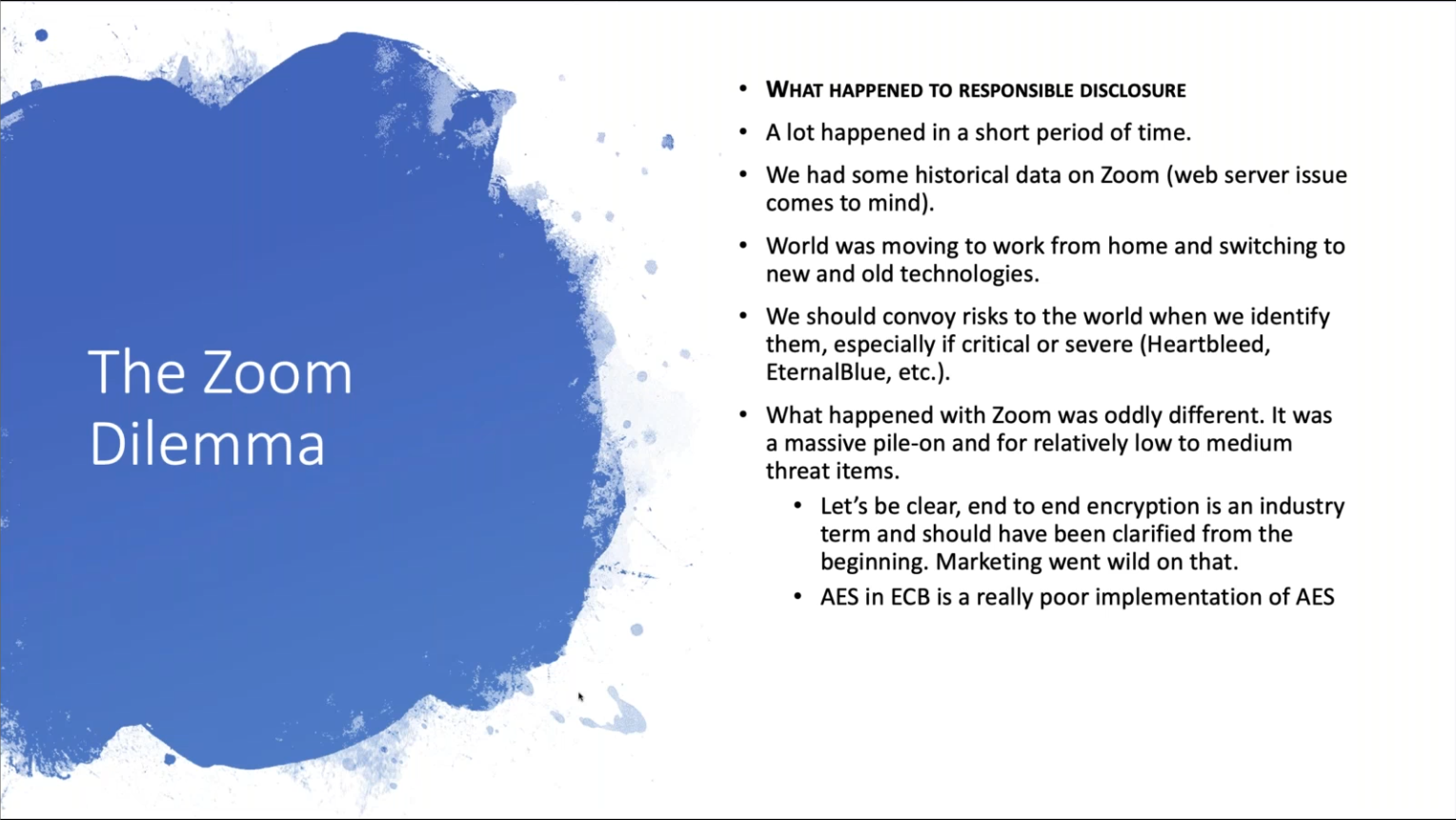
Slide by Dave Kennedy, CEO of TrustedSec and Binary Defense from his closing remarks at Grimmcon.

Zoom is not malware. Repeat with me…  ZOOM IS NOT MALWARE!

Zoom has been everywhere and on many peoples minds. We have also failed the company, not by finding holes in their software, but by playing the role of chicken little. The sky is not falling, at least not from Zoom. We in the world of security have lost it, and as Dave Kennedy said at Grimmcon this week, and I paraphrase, “We have pushed back our relations with the everyday person. We have forgotten that usability is part of our equation of risk, and that responsibility in disclosing of bugs is important.”

Here is a great blog post about the whole situation with Zoom (written by Amit Serper and Dave Kennedy): https://medium.com/@0xamit/zoom-isnt-malware-ae01618e2046

To those that do not want to read that, here are a few key points:

  1. Zoom usage grew from 10 Million people to 200 Million people in a matter of weeks. That is 20x the people in a matter of weeks, unbelievable growth in a product.
  2. Zoom has made mistakes and has bugs. All software does, and the real proof of a company is how they respond.
  3. Zoom has a PDF of best practices for securing Zoom meetings.

On point 2, Zoom has not only been fast to respond and push out fixes, but has not complained about people finding these issues. As of April 2, 2020 Zoom announced a 90 day hold on any new features to focus on security fixes. This is amazing in its own right. I have not heard of many companies doing this. These bugs that Zoom has been fixing have been fixed in a matter of days in most cases. Last time I checked Microsoft, Apple, Cisco, Oracle, take months or longer to fix bugs in most cases. They have done this with no warning about the bugs, they are hearing about them at nearly the same time as we are. Google, Microsoft, Oracle, Cisco, usually get 90 days from notification of a bug to fix it, and the bug is usually not announced until a fix is out.

As far as End to End Encryption goes, that was a marketing mistake. Cisco WebEx, while offering End to End Encryption, does not offer it for Video conferencing. There also have been plenty of flaws found on WebEx and other Video conferencing systems over the years.

As far as the breach with usernames and passwords, all I have to say is.. Target, Best Buy, Home Depot, Equifax, Anthem, need I go on?

Zoom has made mistakes, no doubt. They are not perfect, but their model is one of simplicity. One of allowing people to communicate easily, and that is what it was easy. Easy for grandma to not have to log into anything and just take a link sent to her by her family to video chat with them. Easy to just set up and go. It was not designed to be used for State Secrets. Its threat model at the time was different than what it was starting to be used for by Governments and Corporations. It is a product that got shoved under a microscope, and has responded to being under that microscope a lot better than many companies I have seen over the years.

So yes, Zoom is safe for the everyday person to use. Zoom now defaults to requiring passwords for the meeting sessions. Zoom now wants people to log in. Zoom has taken away some of its simplicity. Zoom is not Malware!


Filed Under: Rants, Security, Software Tagged With: Dave Kennedy, WebEx, Zoom

  • 1
  • 2
  • 3
  • …
  • 22
  • Next Page »

RSS Taggart Institute Intel Feed

  • University of Sydney suffers data breach exposing student and staff info December 18, 2025 Bill Toulas
  • Clop ransomware targets Gladinet CentreStack in data theft attacks December 18, 2025 Sergiu Gatlan
  • Your car’s web browser may be on the road to cyber ruin December 18, 2025 Thomas Claburn
  • I am not a robot: ClickFix used to deploy StealC and Qilin December 18, 2025 Mindi McDowell
  • Adios 2025, you won’t be missed December 18, 2025 Joe Marshall
  • Crypto crooks co-opt stolen AWS creds to mine coins December 18, 2025 Jessica Lyons
  • Over $3.4 billion in crypto stolen throughout 2025, with North Korea again the top culprit December 18, 2025
  • The Curious Case of the Comburglar December 18, 2025 BHIS
  • Kim's crypto thieving reached a record $2B in 2025 December 18, 2025 Connor Jones
  • U.S. Sentencing Commission seeks input on criminal penalties for deepfakes December 18, 2025 djohnson

Browse by tags

Active Directory Android Antivirus Apple Beta Chrome Computers Exchange Exchange 2007 Firefox General Thoughts Google InfoSec Internet Explorer iOS iPad IT Linux Mac Malware Microsoft OS OSx Patches Rants SBS SBS 2008 Security Security Patches Server SMB Software Support Surface TechEd Tweets Ubuntu Verizon Virus Vista vulnerabilities Windows Windows 7 Windows 8 XP